• Skip to primary navigation
  • Skip to main content
  • Skip to footer
  • LCA Portal
  • LAMP2
  • LCA Online Donations
  • LCANZ Service Centre
  • Contact

Lutheran Church of Australia

where love comes to life

  • HOME
  • ABOUT US
  • The Latest
    • News
      • The Latest News
      • LCA eNews
      • Calls – Employment – Volunteering
      • Daily Devotions
      • The Lutheran
    • Resources
      • Worship Planning Page
      • Online Worship
      • Congregation Leaders
      • Bulletins and Announcements
    • Events & Projects
      • Implementation of Ordination Resolution
      • Convention of General Synod 2024
      • Convention of General Synod 2025
  • Congregational Life Hub
      • Congregational Life Hub
        Resources and support for all areas of your congregation’s life
        Visit the hub
      • Worship & Faith – Inspiring worship and growing in faith
      • Mission – Equipping congregations for local mission
      • Ministry – Encouraging congregations in ministry
      • Pastoral Care – Supporting those involved in caring for others
      • Governance & Admin – Equipping those involved on church boards and committees
      • Vacant Congregations – Supporting congregations in vacancy
      • Safe Church – Helping you to protect the people in your care
      • Church Workers – Assisting employing and calling bodies
      • Training – Equipping you for serving others
  • FIND A CHURCH
  • CONTACT US

How to log into the LCA Portal and SharePoint for committee access

23 October 2024


Print Friendly, PDF & Email

This guide will take you through on how to access meeting documents that relate to your LCA Committee.
If you do not have a direct link via email to the required committee documents, you can access the LCA SharePoint committee site via the LCA Portal.

You can do this by going to http://www.lca.org.au.
At the top of the page, you will see a link labeled LCA Portal. As shown below in the red circle.
 
When you click on this link you will be presented with the below page

 Enter your LCA Email and password – click Sign in.

If you logged in is successfully, you will be redirected to the LCA Portal.

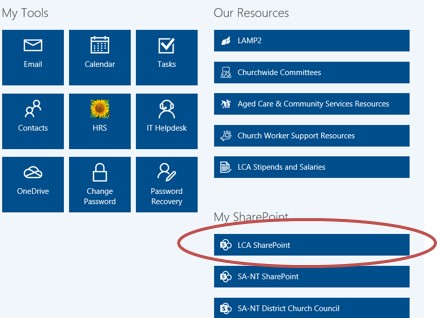
The portal will look like the screen on the right (subject to change as this is growing).

To access the committee notes, start by going to the LCA SharePoint found under ‘My Sharepoint’.

Clicking on this icon will open a separate window or tab and take you to the LCA SharePoint site. *You may be asked to re-enter your LCA Email address and password to enter this site
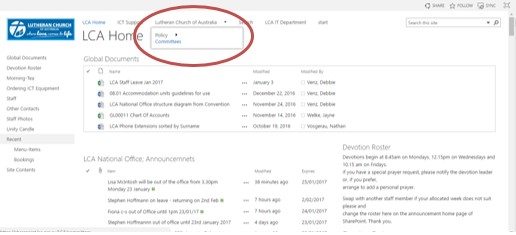
 Once logged in, select ‘Lutheran Church Australia’ and go to ‘Committee’ to access your Committee documents.
 You will be presented with the following page:

 Find your committee and click on the icon to be taken to your meeting documents. If you click on a committee that is not one that you are a part of, you will not be able to gain access.

For support: http://itsupport.lca.org.au and submit a job (you will need your username and password).

Alternatively you can contact us on 08 8267 7380 between 8:30am to 4:30pm (CST) or email us on itsupport@lca.org.au.

Footer

Quicklinks

  • HOME
  • NEWS & FEATURES
  • CALLS – EMPLOYMENT


  • FIND A CHURCH
  • WORSHIP PLANNING PAGE

Contact us

139 Frome Street
Adelaide SA 5000

08 8267 7300

© 2026 Lutheran Church of Australia

Privacy Policy • Disclaimer

Designed by LCA Communications