• Skip to primary navigation
  • Skip to main content
  • Skip to footer

Lutheran Church of Australia

where love comes to life

Menu
  • ABOUT US
  • THE LATEST
    • News
    • Flashback Friday
    • Calls – Employment – Volunteering
    • Daily Devotions
    • Worship Planning Page
    • The Lutheran
    • Bulletins and Announcements
  • CONGREGATIONAL LIFE HUB
  • FIND A …
    • Church
    • School
    • District
    • Resource
    • Project or Event
    • Ministry or Service
    • Agency or Ministry Partner
    • Aged or Community Care Service
  • CONTACT US
LCA Portal LAMP2 LCANZ Service Centre Donate

How to set up your LCA email on an iPhone

22 May 2026


Print Friendly, PDF & Email

How to set up your LCA email on an iPhone

To setup email on your iPhone:

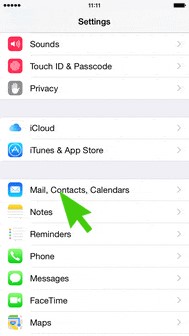
  1. Click on Settings

2. Click on Mail, Contacts, Calendars
3. Click on Add Account
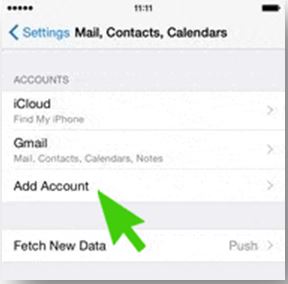

4. Select Exchange and enter your LCA email address and password

5. Choose what you would like synced and click save.

Your email will then start to be downloaded and shown in the iPhone Mail application.

For support: https://its.lca.org.au/ and submit a job (you will need your username and password).

Alternatively you can contact us on 08 8267 7380 between 8:30am to 4:30pm (CST) or email us on ithelpdesk@lca.org.au.

Footer

Quicklinks

  • HOME
  • NEWS & FEATURES
  • CALLS & EMPLOYMENT


  • FIND A CHURCH
  • WORSHIP PLANNING PAGE

Contact us

139 Frome Street
Adelaide SA 5000

08 8267 7300

© 2026 Lutheran Church of Australia

Privacy Policy • Disclaimer

Designed by LCA Communications