How to Backup your LCA Email with Outlook

How to Backup your LCA Email with OutlookThis guide will take you through how to create a backup file and archive your LCA email through Outlook. This guide will work for Outlook 2013/2016
Creating an Outlook backup can be done by following the steps below:
- Open Outlook to access your LCA Email account.
- Select File in the top left corner

3. Open the Open & Export menu on the left and select Import/Export option
4. Choose the second option in the list – Export to a file.
5. Click Outlook Data File (.pst), and then click Next.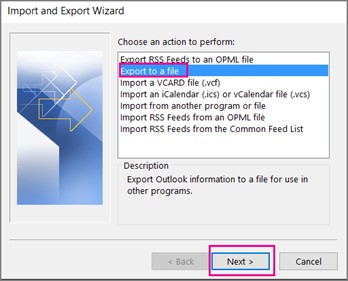
6. Select the name of the email account to export. Only information for one account can be exported information at a time.
7. Make sure that the Include subfolders check box is selected. This way everything in the account will be exported: Calendar, Contacts, and Inbox etc.
8. Choose Next.
9. Select Browse to navigate where you want to save the Outlook Data File (.pst) locally to your computer. Type a file name and select OK to continue. (Remember where you have saved your file as you may need it to import later back into Outlook or to copy the file to another device)
10. If you are exporting to an existing Outlook Data File (.pst), under Options, specify what to do when exporting items that already exist in the file.
11. If required, create a password for the file, otherwise, press OK.

12. Click Finish.
13. You have now created an Outlook backup file.
If you experience problems:
For LCA IT Services (Support): http://itsupport.lca.org.au and submit a job (you will need your username and password), and an IT Officer will respond to your query.
Alternatively you can contact us on 08 8267 7380 between 8:30am to 4:30pm (ACST) or email us on itsupport@lca.org.au.
