How to add members into a distribution list using Outlook

This guide will take you through how to add members into an Outlook Distribution List that you own in the LCA GAL (Global Address List) using Outlook 2013/2016.
- To add or change a user in an Outlook Distribution List start by opening Outlook.
- Once Outlook is open go to the Address Book

- Find the Distribution Group by searching for the name
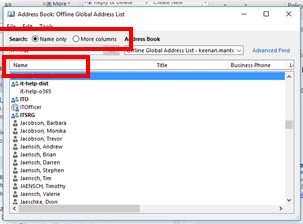
- Select the group you wish to modify by double-clicking on the name to open its properties page
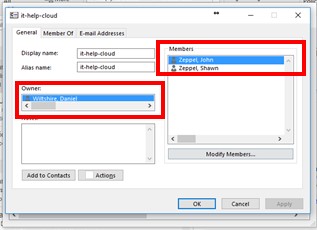
- You can see the current list of owners on the left-hand side.
- To modify the current list of users, select Modify Members on the right. This will allow you to add or remove users.
- When the change are made click OK in all open dialog boxes to save the changes.
If you experience problems:
For LCA IT Services (Support): http://itsupport.lca.org.au and submit a job (you will need your username and password), and an IT Officer will respond to your query.
Alternatively you can contact us on 08 8267 7380 between 8:30am to 4:30pm (ACST) or email us on itsupport@lca.org.au.
